


A practical guide to customer service automation for WhatsApp-first businesses : “What are your opening hours?” “Can you send the brochure?” “How do I book an appointment?” Your team may answer these questions dozens of times a day while customers with more complex problems wait. Customer service automation helps you answer predictable questions, collect essential details and guide customers to the next step without an employee joining every conversation. For businesses that receive enquiries on WhatsApp, this can begin with a few well-designed FAQ flows.
Can you solve 80% of repetitive customer queries without human intervention? Treat that figure as a target to test against your own data, rather than a guaranteed result. The outcome depends on which questions customers ask, how reliable your answers are and whether your workflows can actually finish the task. The practical starting point is usually a narrow question that your team already answers well, such as office timings, package inclusions or the steps for requesting an appointment. When the approved information and the next action are clear, you can design a journey that finishes that specific job. When a request depends on a live system or a judgement call, the process needs an honest boundary and a useful handoff. That distinction lets you reduce repetitive work while keeping the customer’s actual outcome at the centre of the workflow.
What does solving 80% of repetitive queries actually mean?
First, define the denominator. If your business receives 1,000 support conversations and classifies 600 as repetitive, resolving 480 of those automatically equals 80% of repetitive conversations. It equals 48% of all support conversations. This is an illustrative example, not an Implifie customer result. An automated greeting does not count as a resolution. Neither does collecting an order number and leaving the customer waiting. Count a conversation as resolved only when the customer receives a correct answer or completes the intended task without an agent’s help. Track later reopens within a consistent review window.
Agree on the definition before launching the flow, and make it understandable to the people reviewing conversations. A brochure request may be complete when the correct brochure is delivered, whereas an appointment request remains incomplete until the required confirmation has been provided. Use the same definitions for manual and automated journeys so the comparison remains meaningful. It also helps to review a sample of conversations that the system marked as finished: a closed chat can conceal a confused customer, an unanswered follow-up or a task that was simply abandoned. Keep the example figures separate from actual business results and give the review team a way to correct a mistaken resolution label.
Which customer queries should you automate first?
Start with frequent questions that have stable, approved answers and clear next steps. Personalised questions need more than a static answer. “Where is my order?” requires a reliable order-system connection and appropriate customer verification. “Can I get a refund?” may require someone to review the case. Automate the information you can safely provide and make the next step clear when a person must decide. For each candidate, ask whether the customer can reach a useful stopping point using information your business can keep accurate.
Opening hours may be straightforward, but a location-specific service could need an extra question before the correct answer is known. A request for a brochure can often finish with the right document, while an exception to a published policy may still need an employee. Record the source of each answer, the person responsible for maintaining it and the condition that should trigger handoff. That small amount of preparation makes it easier to choose a first workflow that can help customers consistently. It also prevents a popular question from being automated before the business has settled what the correct answer should be.
- Business information: opening hours, office location, service areas and contact options.
- Product and service FAQs: features, standard inclusions, published prices and eligibility basics.
- Document requests: brochures, catalogues, application checklists and preparation instructions.
- Routine processes: how to book, how to apply, how to request a return or where to find an invoice.
| Customer request | Automated response | When to involve a person |
|---|---|---|
| Opening hours or location | Share the current approved details | Information is missing or location-specific details are unclear |
| Package inclusions | Share the approved brochure and standard inclusions | The customer wants a custom itinerary or live flight quote |
| Booking request | Collect service, preferred date and contact details | Availability cannot be verified or the booking fails |
| Order or payment status | Read the status from a configured connected system | The connection fails or the customer disputes the result |
| Complaint or exception | Collect context and explain the next step | A decision, refund exception or human judgement is needed |
How to build customer service automation in seven steps :-
1. Find the questions consuming your team’s time :
Review a representative sample of recent support conversations. Group messages by customer intent rather than exact wording: “Fees?”, “What is the cost?” and “Send your pricing” may belong to the same group. For each group, record frequency, typical handling time, the information needed and how often an exception occurs. Start with a handful of high-volume, straightforward intents. A rarely used but complicated workflow is usually a poor first project. Include conversations that were abandoned or passed between colleagues, rather than reviewing only the easiest successful chats.
Those examples reveal missing context and the questions that customers found difficult to answer. A simple review sheet can record the intent, the approved information needed, whether a connected system is required and the point at which an agent would normally step in. If several requests look similar but require different outcomes, keep those differences visible. Asking for a brochure and asking for a custom quotation may start with the same words but involve different work. Prioritise a journey that is frequent, well understood and easy to review after launch, then use the first results to choose the next improvement.
2. Create one approved answer for each intent :
Build a knowledge base from information your team can stand behind: current policies, published service details, troubleshooting guides and booking instructions. Give each answer an owner and a review date. Keep replies short enough for a chat screen. Answer the question first, then offer one useful action, such as “View packages” or “Book an appointment.” If the answer changes by location or service, collect that detail before replying. An approved answer needs to be useful in the moment, rather than a long policy pasted into a message bubble.
Check whether it answers the customer’s question directly, uses words the customer understands and explains a realistic next step. Where the answer depends on a branch, location or product, make that dependency part of the flow. Keep a record of when the source information was last checked and who should update it after a change. If the team cannot agree on an answer, resolve that uncertainty before automating it. The bot should not be expected to settle a policy that employees themselves interpret differently, and a confident tone should never be used to hide missing information.
3. Choose a flow, AI or a combination :
Use rule-based FAQ automation when the choices and answers are predictable. A menu with “Pricing,” “Office location” and “Talk to our team” can be easier to maintain than a broad open-ended bot. AI can help interpret different phrasings and use approved knowledge where supported. Give it boundaries: it should ask a clarifying question or hand over when it lacks reliable information. AI reply suggestions reviewed by an employee still involve human intervention; report them separately from fully automated resolutions. Implifie’s WhatsApp chatbot builder supports no-code workflows for FAQs, data capture and human handoff. Its AI assistance also includes reply suggestions and chat summaries.
Choose the available features and plan that match your intended workflow. For a first release, choose the simplest approach that can complete the selected task accurately. A short menu is useful when the choices are known, while open wording can help when customers describe the same need in several ways. In either case, test the boundary between an answer the workflow can provide and a question that needs more information. Tell the customer what happens next when that boundary is reached. Also separate assistance for employees from unattended resolution in your reporting: a suggested reply that an agent reviews can still save time, but it is a different outcome from a conversation completed without an agent joining it.
4. Connect the information needed to finish the task :
A WhatsApp chatbot for customer support should do more than acknowledge a request. It needs the information and actions required to complete the specific journey. For example, a booking flow might collect the service, preferred date and location. It should confirm an appointment only after checking actual availability through a configured booking connection. Without that connection, it should describe the submission as a booking request and explain how confirmation will follow. The same principle applies to order tracking, payment status and stock availability. Connect the relevant system where supported; never invent a live status.
Integration availability, setup and access permissions will depend on your business systems and plan. Map the required information before enabling an action. For an appointment, that might mean the service, location, customer details and a successful availability check; for an order enquiry, it might mean identifying the correct order and reading its current status. Decide what the customer should see when one of those inputs is unavailable. A temporary connection failure should lead to a clear pending request or a person who can help, rather than an invented status. Test duplicate submissions and interrupted journeys as well as the happy path, because a customer may retry when they are unsure whether an earlier request went through. The flow should help them recover without creating contradictory confirmations.
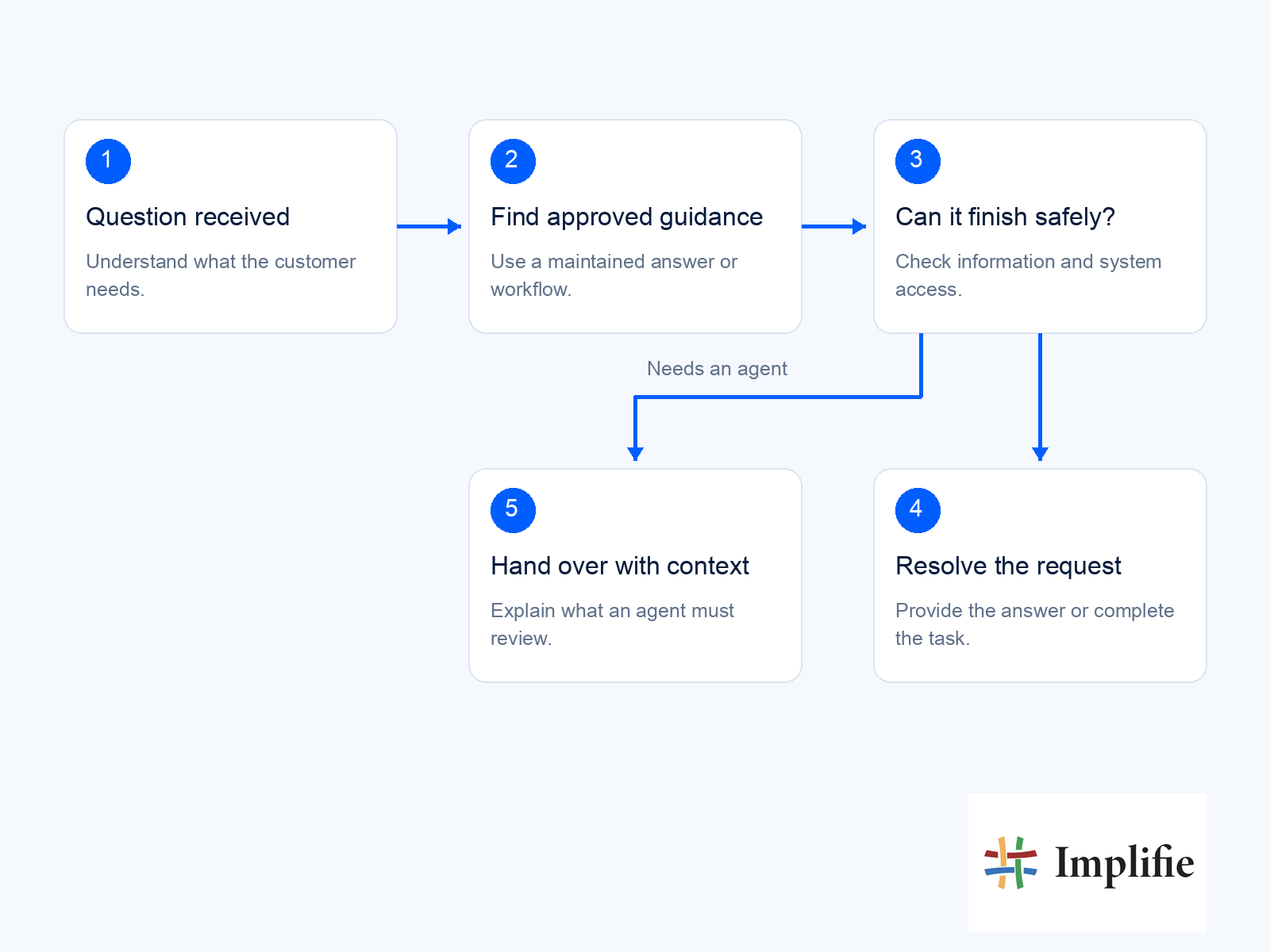
5. Make human handoff easy :
Offer a visible “Talk to our team” option. Route the conversation when the customer asks for a person, the workflow fails, the answer is uncertain or the request needs judgement. A useful handoff carries the original question, details already collected and steps already attempted. Tell the customer what happens next, especially outside working hours. Stop the automated loop once the conversation moves to an agent. Define ownership before the handoff is needed. A customer who asks for a person should know whether an agent is available now, whether their request is queued and what information has already been passed on.
Give the receiving colleague a concise summary alongside access to the original conversation so they can check important details rather than rely on a summary alone. Decide how urgent or specialist requests reach the right person, and provide a backup route when the usual owner is away. Review handoffs that fail to receive a response, because offering a human option is only helpful when someone is responsible for following through. The customer should be able to continue the same task without repeating the whole conversation.
6. Test the journey the way customers use it :
Test short messages, spelling errors, mixed requests, unsupported questions and customers who change their minds halfway through. If customers write in Hindi, Gujarati or mixed English, test those real phrases and confirm the chosen workflow supports them. Check what happens when a connection fails or information is missing. Can the customer recover? Can they reach a person without restarting? Launch with a limited scope, review unresolved chats and expand only after the first journeys work reliably. Create test cases around the customer’s goal, not just around the exact button or sentence the flow expects.
Try a customer who changes the travel month, asks two questions together, provides an incomplete reference or returns after leaving the conversation. Check that previously collected information is handled appropriately and that the next message still makes sense. Ask someone who did not build the workflow to follow it without coaching, and note where they hesitate or misunderstand a reply. Keep a record of each failed test and the expected recovery so a later change can be checked against the same situation. This makes review more practical than relying on a single successful demonstration of the ideal journey.
7. Improve using resolution data :
Review the conversations that automation could not finish. A repeated fallback might reveal missing information, unclear wording or an unnecessary step. Update the relevant answer or flow, then test it again. WhatsApp customer support automation needs ongoing maintenance. A changed policy, new product or revised opening time should trigger an update to the answers customers receive. Give recurring failures a specific owner and a clear follow-up action. If many customers reach the same fallback, inspect whether the missing piece is an answer, an input question, a connection or a rule that sends them down the wrong path.
Make one change at a time where possible so its effect can be understood. Review both completed conversations and handoffs: a rising resolution rate is not an improvement if answers become less accurate or customers return with the same issue. Keep earlier test cases and run them again after an update, especially when changing a shared answer used by several flows. Maintenance is easier when the team knows which information changed and which customer journeys depend on it.
Example: automate a travel package enquiry.
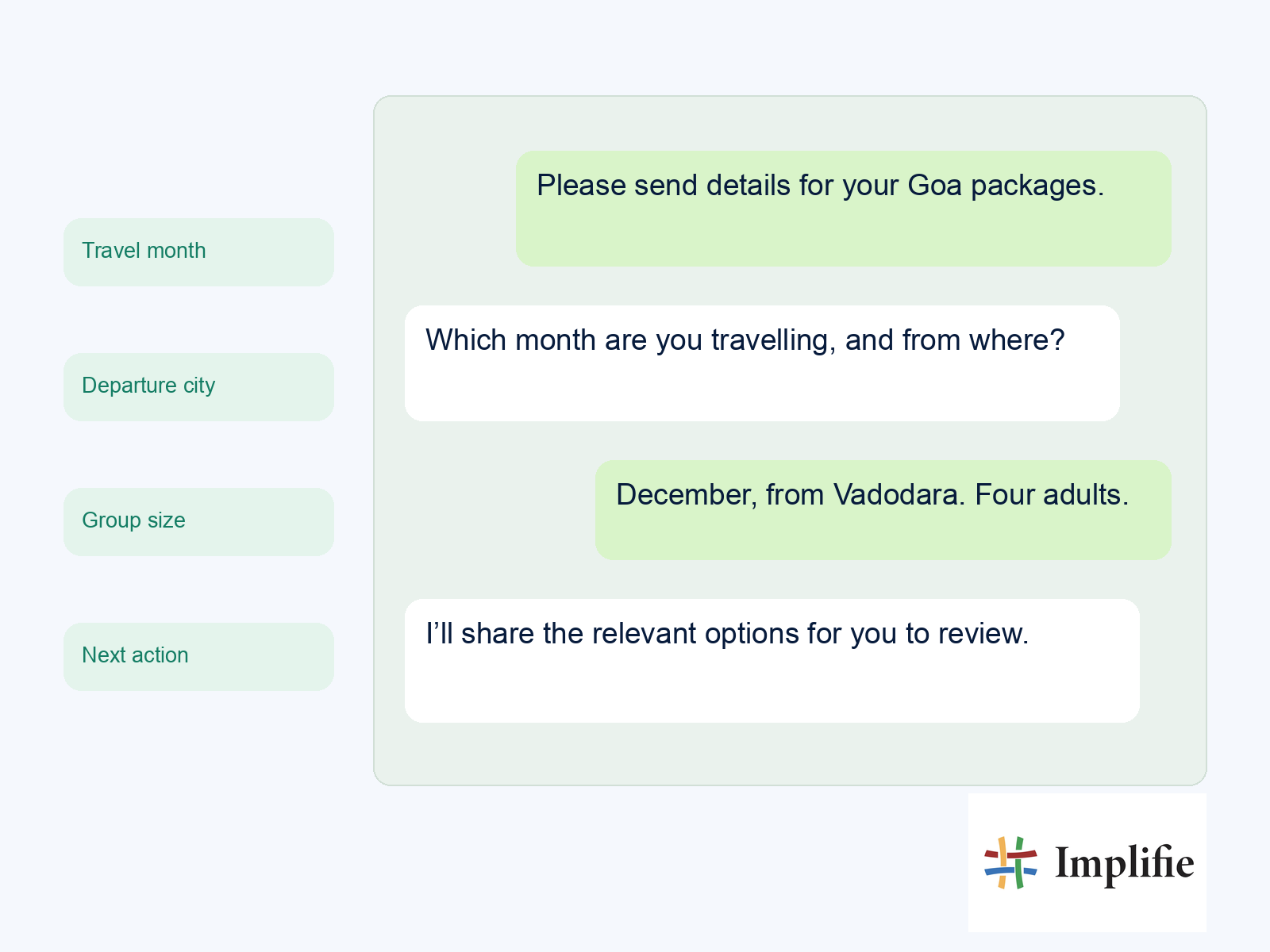
Imagine a travel agency repeatedly receiving “Send Goa package details.” This sample journey shows how an automated conversation could work; it is not a claim that every integration is ready without configuration. A customer who only wants the brochure and inclusions may finish without an agent. A customer asking for a custom itinerary, live flight prices or an exception to a cancellation policy should move to the appropriate person. Collecting their details helps the handoff, but it does not make that enquiry an automated resolution.
Keep the example grounded in information the agency has approved. The workflow can ask enough questions to select the right brochure and explain standard inclusions, but it should not invent live flight availability, a final package price or an exception to a cancellation condition. If the traveller changes the departure city or asks for an additional destination, the next step should reflect that new requirement. A consultant can receive the enquiry details and the documents already shared, then work on the parts that require a tailored response. This gives the customer a useful early answer and gives the consultant a more complete starting point, without treating every information request as an automatically completed booking.
- Ask for the preferred travel month, departure city and group size.
- Share the relevant approved package information and explain what is included.
- Answer standard questions about hotel categories, transport and the booking process.
- Offer a quotation request or a conversation with a travel consultant.
Measure resolution, not just automatic replies :-
Use a clear formula: repetitive-query resolution rate = repetitive conversations resolved without an agent ÷ all repetitive conversations in the same period × 100. Keep the classification and review window consistent. Then monitor the measures that reveal whether customers are actually being helped. An 80% result within your repetitive-query category is only useful if accuracy and customer experience remain strong. A lower rate with reliable answers is a better starting point than an impressive number built on premature closures.
Use the measures together when deciding whether the workflow is helping. A quick response may still be inaccurate, and a low handoff rate may simply mean that customers cannot find the option to reach an agent. Review a consistent set of conversations over a defined period and compare the outcome with the intended task. When a result looks unusually strong or weak, inspect examples before changing the flow. It can help to separate simple information requests from journeys that require a connected system, because those categories have different failure points. Keep the definitions stable across reporting periods so a change in classification does not appear to be a real improvement in resolution.
- Reopen rate: how often an apparently resolved conversation returns with the same issue.
- Handoff rate and reasons: where automation needs a person and why.
- Answer accuracy: whether sampled responses match current approved information.
- Customer feedback: whether the customer felt their issue was solved.
- Agent workload: whether manual handling time falls as automation expands.
How Implifie supports the workflow :-
Implifie brings chatbot workflows, customer records and a shared WhatsApp inbox into one workspace. You can use its chatbot builder for routine journeys and its team collaboration tools to assign conversations that need attention. Customer context helps agents continue a conversation without asking the same questions again. AI reply suggestions and chat summaries can assist those agents, while configured FAQ flows handle the predictable steps. The level of automation depends on the workflow, enabled features and connected systems. A useful rollout begins by mapping those capabilities to one real customer journey.
Decide which questions the workflow will answer, which details belong in the customer record and which events should move the conversation to a colleague. Review the available features and any required connections with the people who will maintain them. The shared workspace matters most when a customer moves between automation and an employee: the agent needs the context to continue the task, and the workflow needs to respect the handover. Start with a manageable scope, review conversations after launch and expand when the team can explain both the successful outcomes and the exceptions. That keeps the process practical instead of turning a feature list into a promise of unattended support for every situation.
Give your team fewer repetitive replies to write :-
Start with the questions your customers ask every day. Give each one an accurate answer, a complete journey and an easy route to your team. Measure what gets resolved, then improve the gaps. Want to see which customer queries your business can automate? Explore Implifie’s WhatsApp chatbot workflows and shared inbox, and map out your first FAQ automation journey. Explore Customer Support Automation with Implifie Choose a first workflow that the team can explain in plain language and review without a complicated reporting exercise.
Write down the question it should answer, the information it relies on and the condition that sends the customer to a person. Then test the journey, including a missing input and a failed connection, before using it more widely. After launch, look at whether customers reached the intended outcome and whether agents received enough context when they took over. Use those findings to decide what to automate next. A dependable answer to a common question, followed by a useful next step, is a stronger foundation than a large collection of flows whose accuracy and handoffs no one has checked.
Keep customer service automation focused on accurate answers and completed customer tasks. Start with one well-defined question, verify the information behind the response and provide an obvious route to a person whenever the workflow cannot safely finish the request.
Frequently asked questions
Can a chatbot resolve 80% of customer queries?
It depends on the query mix and the scope being measured. Eighty percent of a defined repetitive-query category is different from 80% of all support conversations. Validate any target using your own resolution data, answer-quality reviews and reopen rates.
Do I need AI to automate repetitive customer queries?
No. Menus and rule-based chatbot flows can handle many predictable FAQs. AI can add flexibility where supported, but accurate information and a well-designed journey are essential in either approach.
Can I automate customer support on WhatsApp?
Yes. With a suitable WhatsApp Business API platform, you can build FAQ responses, collect details and route conversations to your team. Personalised answers or actions may need additional integrations and configuration.
When should automation hand over to a person?
Hand over when a customer requests an agent, information is uncertain, the workflow cannot complete the task or the situation requires judgement. Keep the context with the conversation so the customer can continue smoothly.
