


A customer has paid, but your reminder still says the invoice is overdue. That message creates work for both sides: the customer has to explain, and your team has to investigate. WhatsApp payment reminders work best when they follow the current invoice balance and payment status. The goal is to make the next action clear for a customer who owes a payment, while keeping paid, cancelled and disputed invoices out of the reminder queue.
Start with one invoice type and a reliable source of payment information. Then decide when a reminder is appropriate, which link the customer should receive and who handles replies. Implifie can support payment-related WhatsApp workflows and follow-ups around a configured connection. Your invoice system or payment provider remains responsible for the financial record. This guide focuses on that practical division of work, rather than assuming a message sent or a link opened means money has been received.
What automated payment reminders need before the first message
An automated reminder needs more than a phone number and a scheduled time. It needs a stable invoice reference, the amount still payable and a way to recognise when the situation changes. If your team receives payments through several channels, make sure those records are reconciled before a message is queued. A payment made by bank transfer should not remain invisible simply because the original reminder contained a payment link. Where reconciliation is manual, define a review step and an owner.
- Invoice reference: Use a unique reference that the customer and your team can recognise.
- Outstanding balance: Read the current balance, including any recorded partial payment or adjustment.
- Due date and status: Distinguish an upcoming payment from an overdue, cancelled or disputed invoice.
- Customer contact: Use the right recipient and the permission recorded for that relationship.
- Payment destination: Check that the link belongs to the correct invoice or payment request and is still usable.
Keep those details connected to the customer record rather than copying them into a separate reminder list that goes stale. A WhatsApp CRM record can help the receiving agent understand the enquiry, while the authorised billing source supplies the amount and status. For ecommerce payment follow-ups, also check whether the order is already paid, cancelled or being refunded. An order event can start a review, but eligibility should be checked again before a delayed reminder is sent.
Build a payment reminder workflow with stop rules
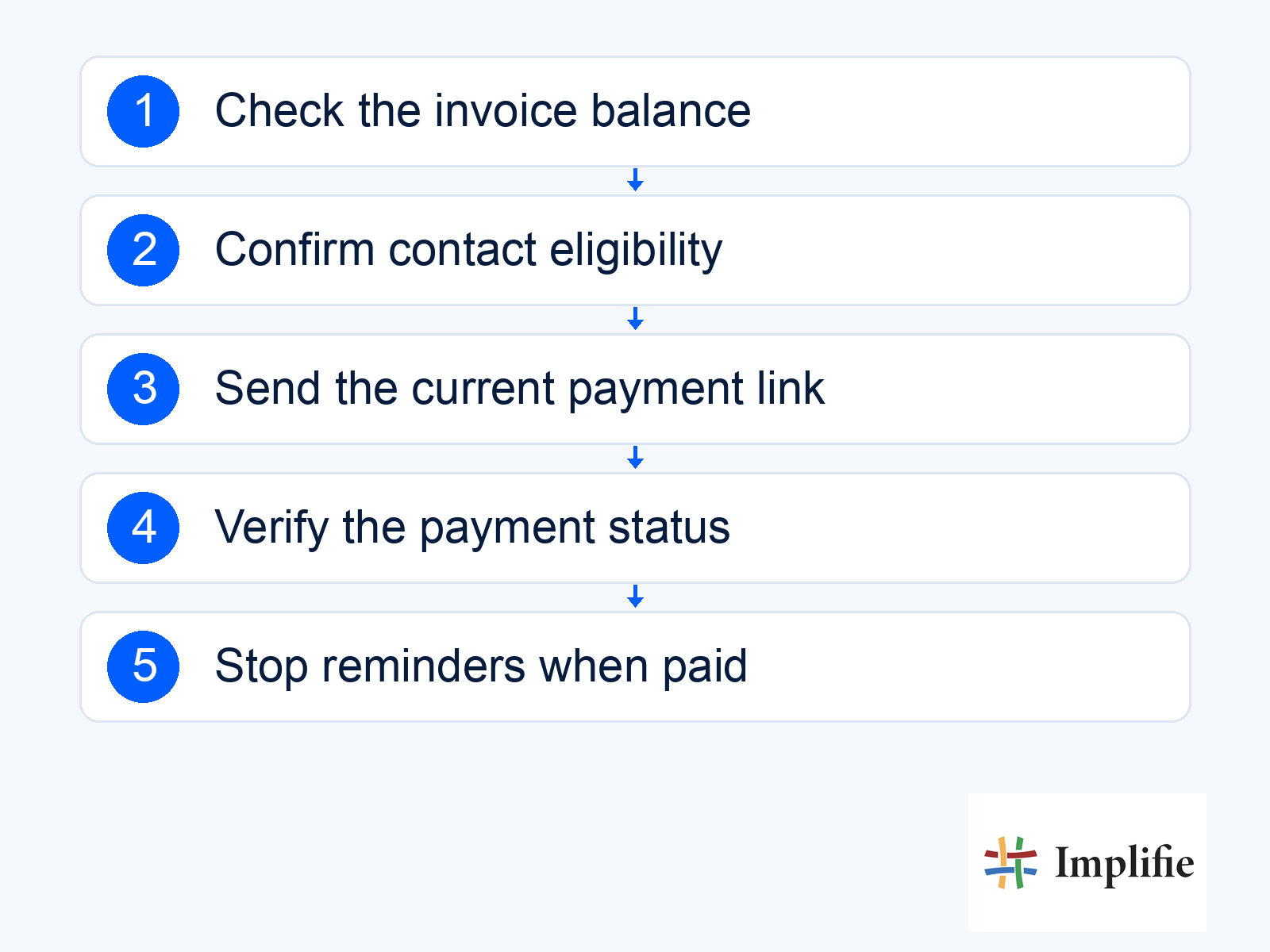
Build the smallest journey your team can test end to end: identify an eligible invoice, send one useful reminder, process a payment update and stop later reminders. Follow-up automation should use the current situation at each step, not only the status that existed when the invoice first entered the workflow. If the billing connection is unavailable, hold the message for review rather than guessing whether the customer still owes money. The following sequence is a practical operating pattern, not a claim that every connection is available without configuration.
- Choose the trigger: Use a due-date review or a supported billing event to find invoices that may need attention.
- Check eligibility again: Confirm the current balance, contact permission, invoice status and any previous reminder.
- Send one clear next action: Include the invoice reference, verified amount and an appropriate payment link or support route.
- Process the response: Read a verified payment update or route the customer’s question to the responsible colleague.
- Stop or review: Remove paid and cancelled invoices from the journey; pause disputes or unverified payment claims for a person.
Razorpay payment links are a payment route, not proof of payment
Razorpay Payment Links can be created through its dashboard or application programming interface (API) and shared with a customer. A link lets the customer open a payment request without your team collecting card or banking details in the chat. Implifie’s Razorpay WhatsApp workflow is a way to coordinate those links and reminders where configured; Razorpay processes the transaction. Confirm the account setup, plan and integration requirements before relying on automatic link creation or status updates.
A hosted payment link and a native in-chat payment flow are different implementations. Sending a link in WhatsApp does not establish that the entire checkout happens inside the conversation. Describe the actual experience the customer will see and test it on a phone. If a link expires or an amount changes, reconcile the invoice before generating another request. Where partial payments are enabled, use the remaining balance rather than repeating the original total and risking a duplicate collection.
| Record status | Customer communication | Operational check |
|---|---|---|
| Unpaid and eligible | Send the relevant reminder and current payment route | Confirm the balance, recipient and link before sending |
| Partly paid | Explain the remaining balance if partial payment is supported | Reconcile the received amount against the invoice |
| Paid | Stop scheduled payment reminders | Match the confirmed payment to the correct invoice |
| Expired or cancelled request | Review before sharing another link | Check whether the invoice remains payable |
| Payment claimed or disputed | Pause reminders and assign an owner | Verify the claim in the authorised financial record |
Write WhatsApp invoice reminders people can act on
The customer should be able to recognise the business, understand the request and choose a next step without reading a long explanation. Use a respectful tone and avoid manufactured urgency. Your reminder can mention the agreed due date, but it should not imply a penalty or service interruption unless that is part of the real agreement. The following sample is wording to adapt to a verified invoice and the applicable template process; it is not a claim that this exact message has been approved.
Hi [First Name], this is a reminder from [Business Name] that invoice [Reference] has an outstanding balance of [Amount], due on [Date]. You can review and pay here: [Payment Link]. If you have already paid or need help with the invoice, please reply so our team can check.
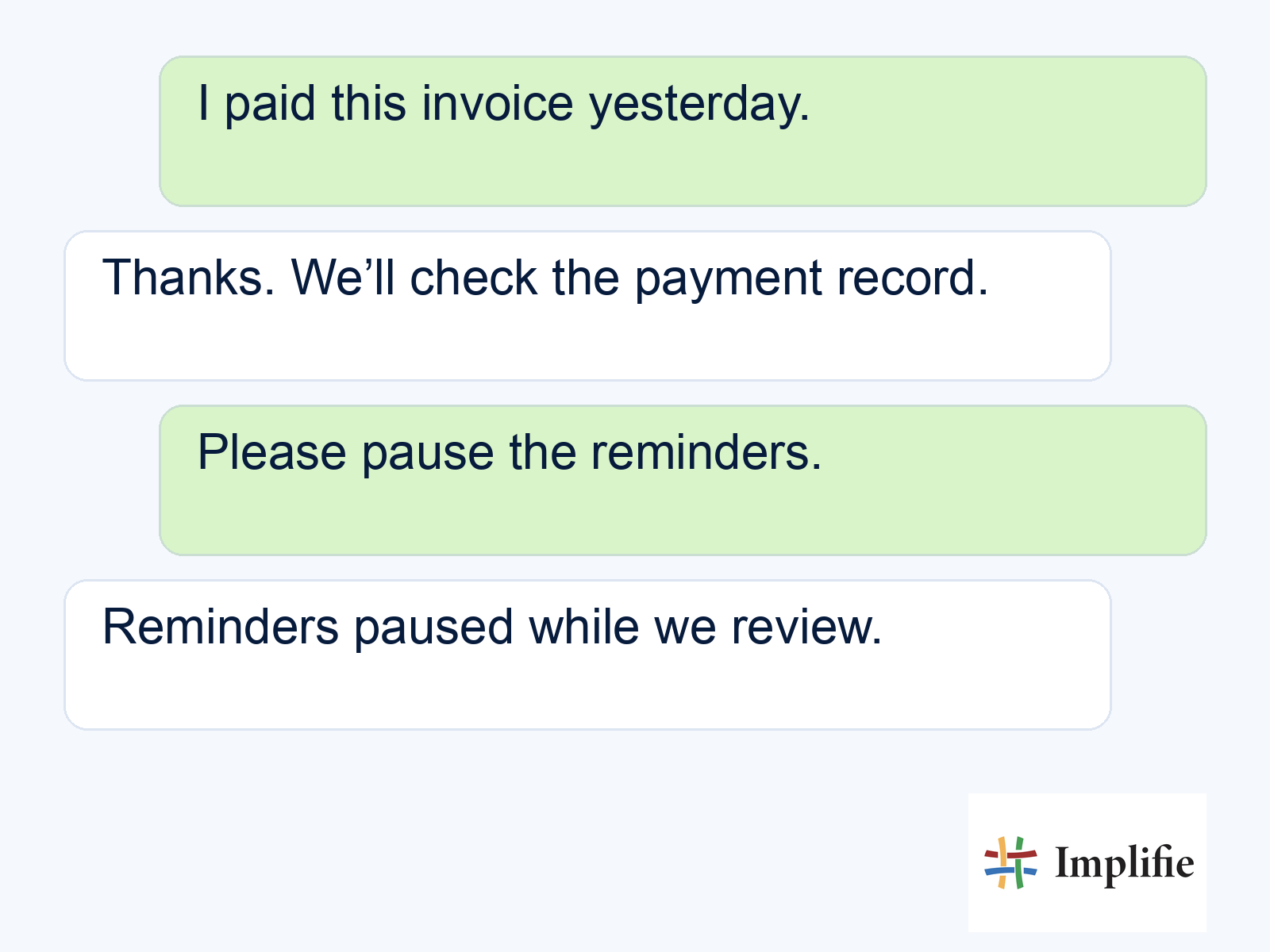
A reply such as “I paid yesterday” should move the conversation into review. A customer’s payment claim is a reason to investigate, not a reason to send another automatic demand. Give the assigned colleague the invoice reference, previous messages and available payment information. The sample below shows that handover in plain language. Keep the workflow paused while the claim is checked, then update the record and tell the customer what was confirmed or what further information is needed.
Verify payment updates before sending confirmation
A payment confirmation should come from the verified financial record, not from a browser redirect or a customer opening the link. If you use webhooks, which are event notifications sent between systems, assign the connection to someone who can validate and maintain it. Razorpay’s webhook guidance covers signature validation, duplicate events and events arriving out of order. Those details matter because one payment event should not create repeated confirmations or reactivate a reminder that was already stopped.
Test a successful payment, an expired link, a partial payment where enabled, a repeated event and a temporary connection failure. Also test a payment received through another accepted channel. Your team should know which system is authoritative, how to match the invoice and who resolves an exception. Supported webhook and API connections can help coordinate the workflow, but availability and behaviour depend on the actual setup. Treat an unverified update as pending until the responsible system or colleague confirms it.
Check messaging rules and measure resolved invoices
Follow the current WhatsApp Business Messaging Policy: obtain required permission, honour opt-outs and use approved templates outside the 24-hour customer service window. Keep a human support route. Review the template’s purpose before adding an offer to a payment reminder; a promotion changes what the message is asking the customer to do.
Measure whether the process helped resolve an invoice, not just whether a message was read. Track completed payments, time to payment, questions requiring an agent and reminders stopped after a status change. Compare similar invoice groups over the same period and review disputes alongside collections. WhatsApp reporting can inform communication performance, while the financial source establishes what was paid. Do not attribute every later payment to a reminder or promise a fixed collection uplift without evidence from your own records.
Start with one dependable reminder journey
Useful WhatsApp payment reminders connect an accurate balance with a clear payment route and a reliable stop condition. Choose one invoice workflow, assign an owner for exceptions and test what happens after payment, cancellation and a customer reply. Expand when your team can explain both the successful cases and the failures. A respectful reminder backed by a current record is more valuable than a busy sequence that keeps asking the wrong customer to pay.
Frequently asked questions
Does a payment link mean the customer pays inside WhatsApp?
Not necessarily. A hosted link can open a payment page. Describe and test the actual checkout your configured provider offers; do not treat link sharing as proof of native in-chat payment support.
What should happen when a customer says they already paid?
Pause the reminder journey, assign the reply to a colleague and verify the payment against the correct invoice. Resume only when the record has been reconciled and another reminder is still appropriate.
Can I send reminders after a partial payment?
If partial payments are supported, reconcile the amount received and show only the remaining balance. Check the invoice and payment-request settings before issuing another link.
Which system should confirm that an invoice is paid?
Use the authorised invoice or payment record. A verified integration update or a responsible colleague can reconcile it; opening a message or payment link does not confirm a completed payment.
